Every rental business has customers who love their service. They come back, they leave reviews, and — whether they say it out loud or not — they tell their friends. The problem is that this word of mouth is completely uncontrolled: it happens by chance, at an unpredictable moment, and you can’t measure it or steer it.
A bring-a-friend program fixes exactly that. It turns “by the way, there’s a good rental place” into a repeatable mechanism: customers get a personal invite code, share it, and both they and their friend receive a clear, automatic reward.
Why word of mouth fits rentals especially well
Renting equipment is a low-risk, high-trust purchase. Nobody rents a bike, skis or a SUP board from a stranger out of nowhere — people rent from someone they already trust. And the strongest trust signal for a new customer isn’t an ad, it’s a recommendation from a friend.
For rental businesses this channel is also cheap in the truest sense: a satisfied customer costs nothing to reach, and the reward you give them is small compared with the cost of acquiring a new customer through paid ads.
How the mechanism works
A bring-a-friend program in Turborent has a simple loop:
- Your customer opens the “Bring a Friend” page in their customer portal and sees their personal invite code.
- They share the code or a link — in a messenger, on social media, or by showing the QR code in person.
- The friend enters the code when registering or making a first order.
- The friend gets a discount on their first rental.
- The referrer receives loyalty points once the friend completes that first order.
Everything else — tracking, attribution, discount application — happens automatically.
Setting up the program
The program is configured in one place under Customer Portal → Bring a Friend → Settings:
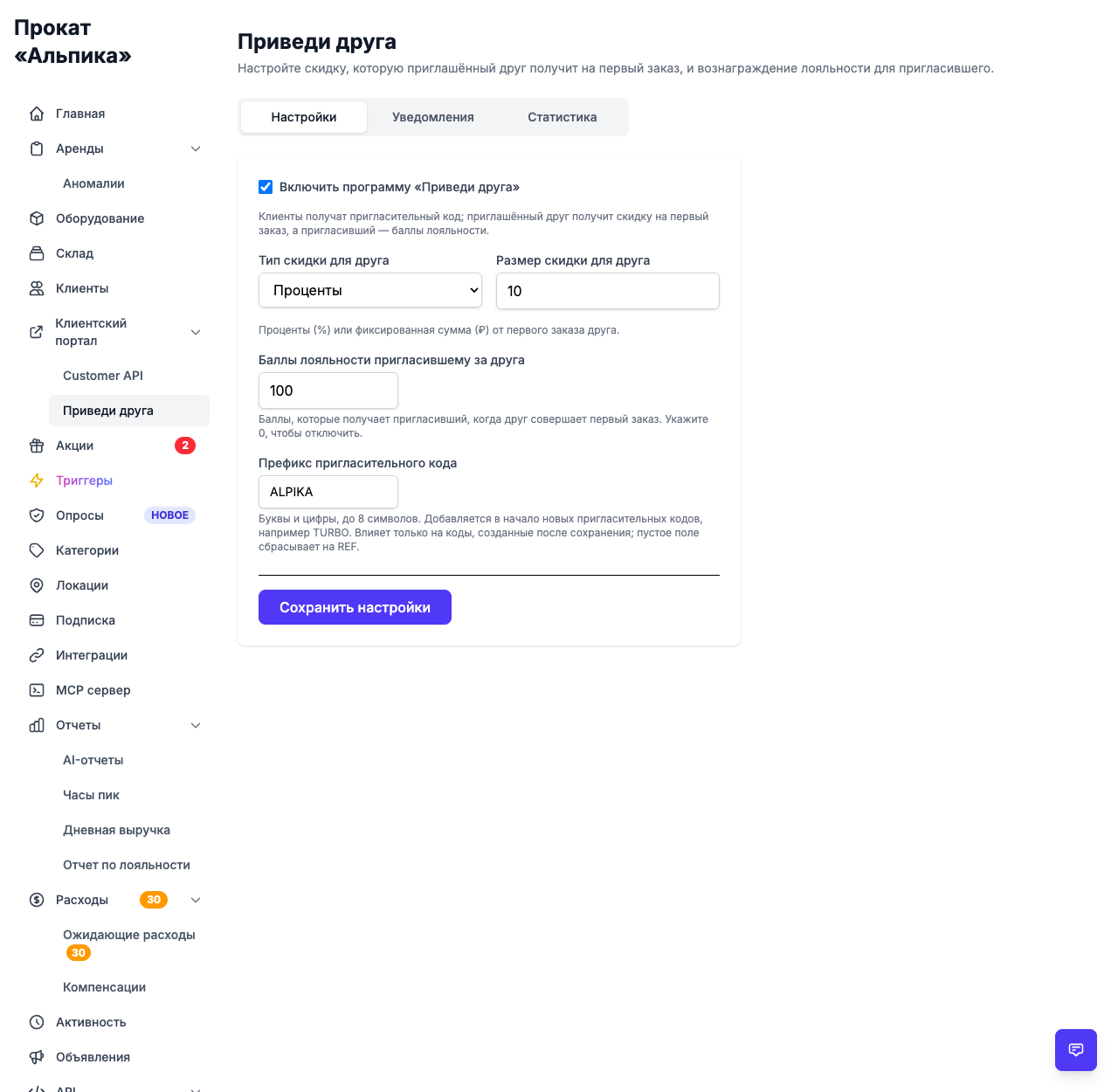
Key settings:
- Program on/off — you can enable and disable the whole program in one toggle.
- Friend discount — a percent (for example 10%) or a fixed amount in your currency, applied to the friend’s first rental.
- Referrer reward — loyalty points the referrer receives for each friend who completes their first order.
- Notifications — optional SMS and email to the referrer when a friend makes their first rental.
- Invite code prefix — up to 8 letters or digits added to the start of every new code. We used
ALPIKAhere, so codes look likeALPIKAAMIgh7Oxinstead of randomly generated strings. The prefix only affects codes created after you save it, so already-shared codes keep working.
The customer’s share page
Customers see the whole program on one page in the portal: their invite code, what the friend gets, a compact QR code for in-person sharing, a “copy link” button, and their own stats — how many friends joined and how many rewards they’ve earned so far.
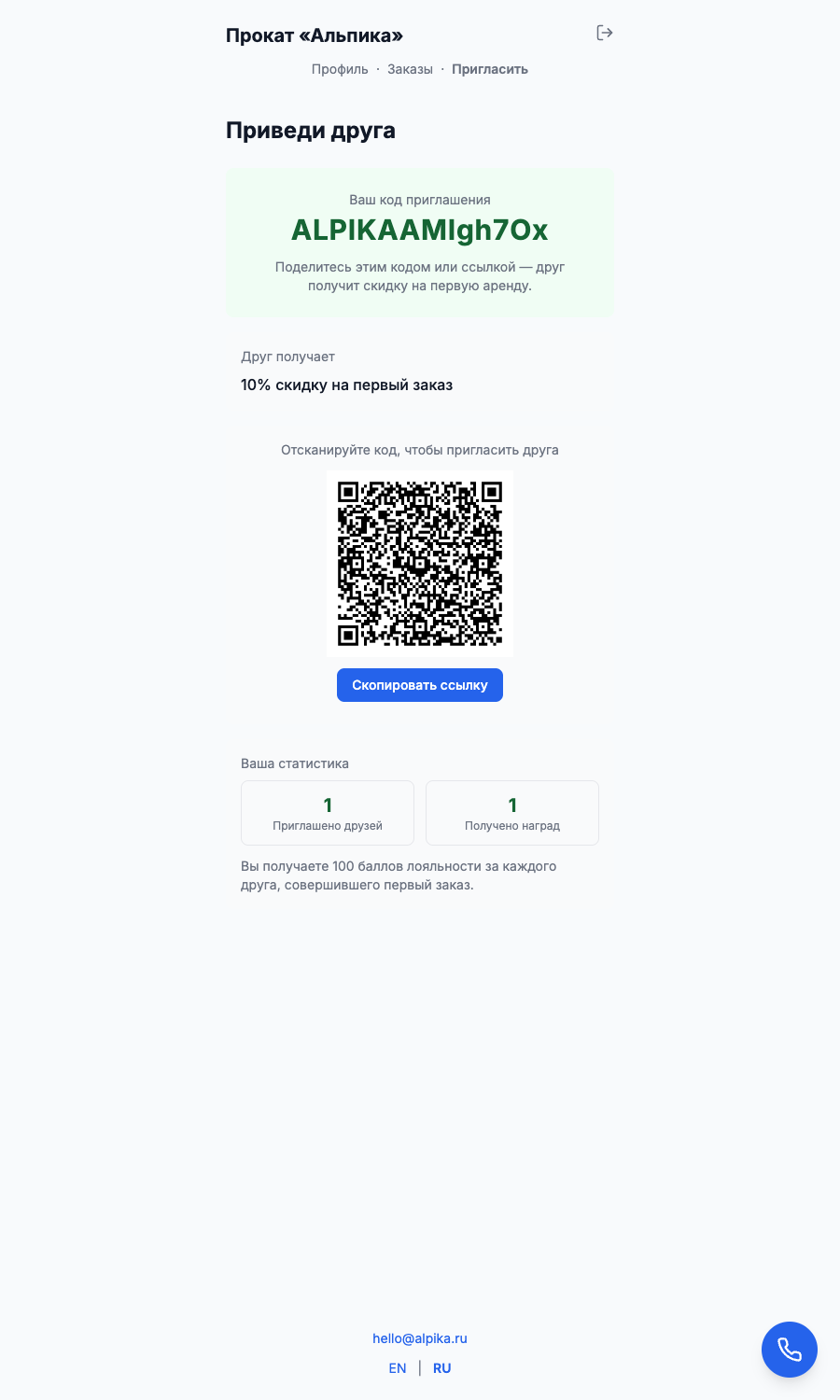
The page tells the customer everything they need at a glance, so there’s no need to explain the rules over the phone.
What happens at checkout
Attribution and rewards are automatic, so there’s no “bring the paper coupon” awkwardness:
- When a friend enters an invite code, the system links them to the referrer — it can’t be reused by the same person, and nobody can invite themselves.
- On the friend’s first completed order, the discount applies automatically to the final total.
- The referrer gets their loyalty points without any manual action, just as the friend’s first rental completes.
All the counting happens in the background, which means the program works exactly the same at the front desk and through the customer portal.
Referrer notifications
When a friend completes their first rental, the referrer can be notified automatically. The message templates are editable: person’s name, friend’s name, points and your organization name are inserted into the text on the fly.
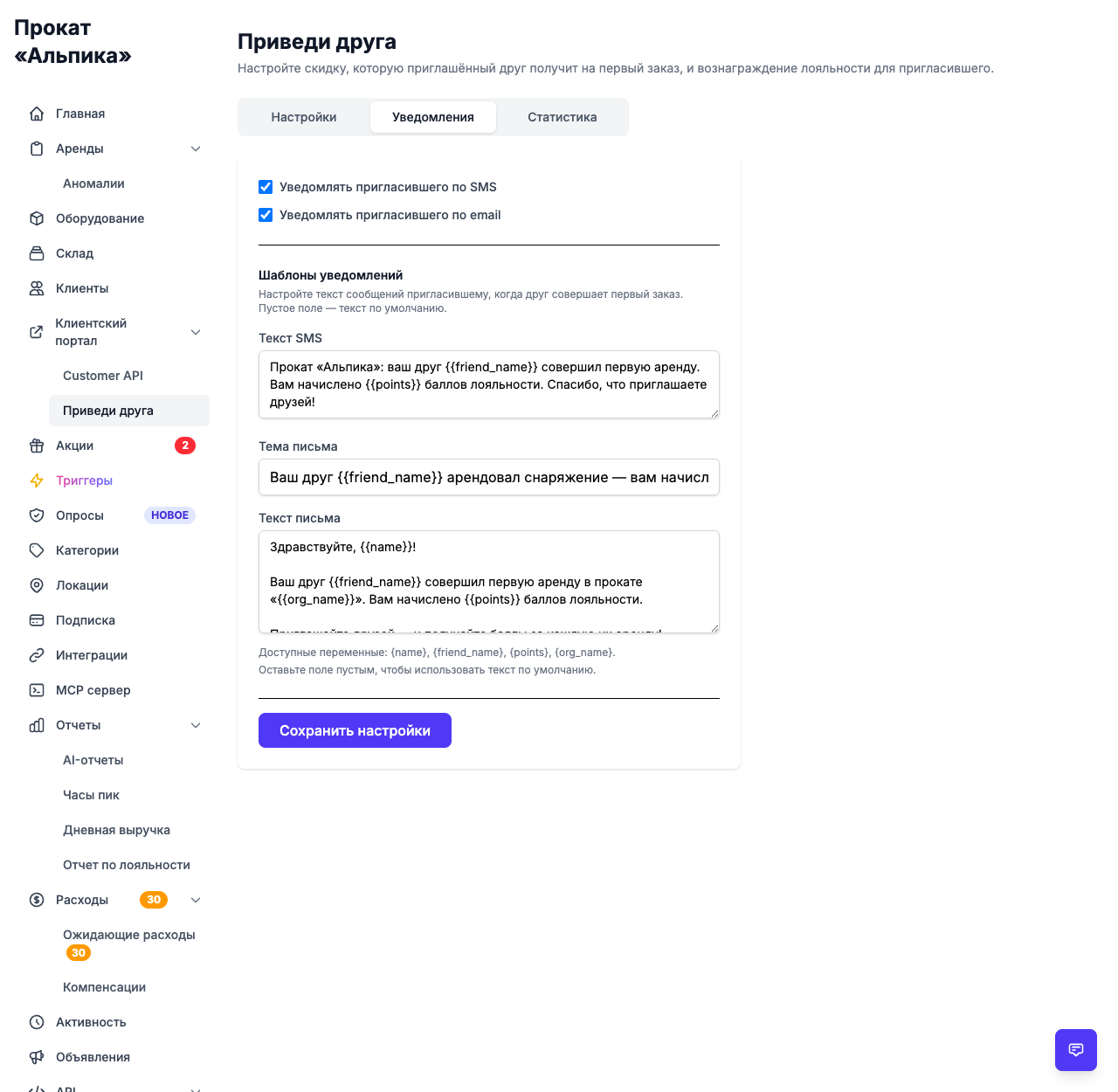
For example, an SMS might look like this:
Альпика rental: your friend has made their first rental. You’ve earned 100 loyalty points. Thank you for inviting friends!
A timely reminder like this is what keeps a customer sharing the code again next season.
What to watch in the metrics
The program is worth optimizing, not just launching. The Statistics tab shows exactly the numbers that matter:
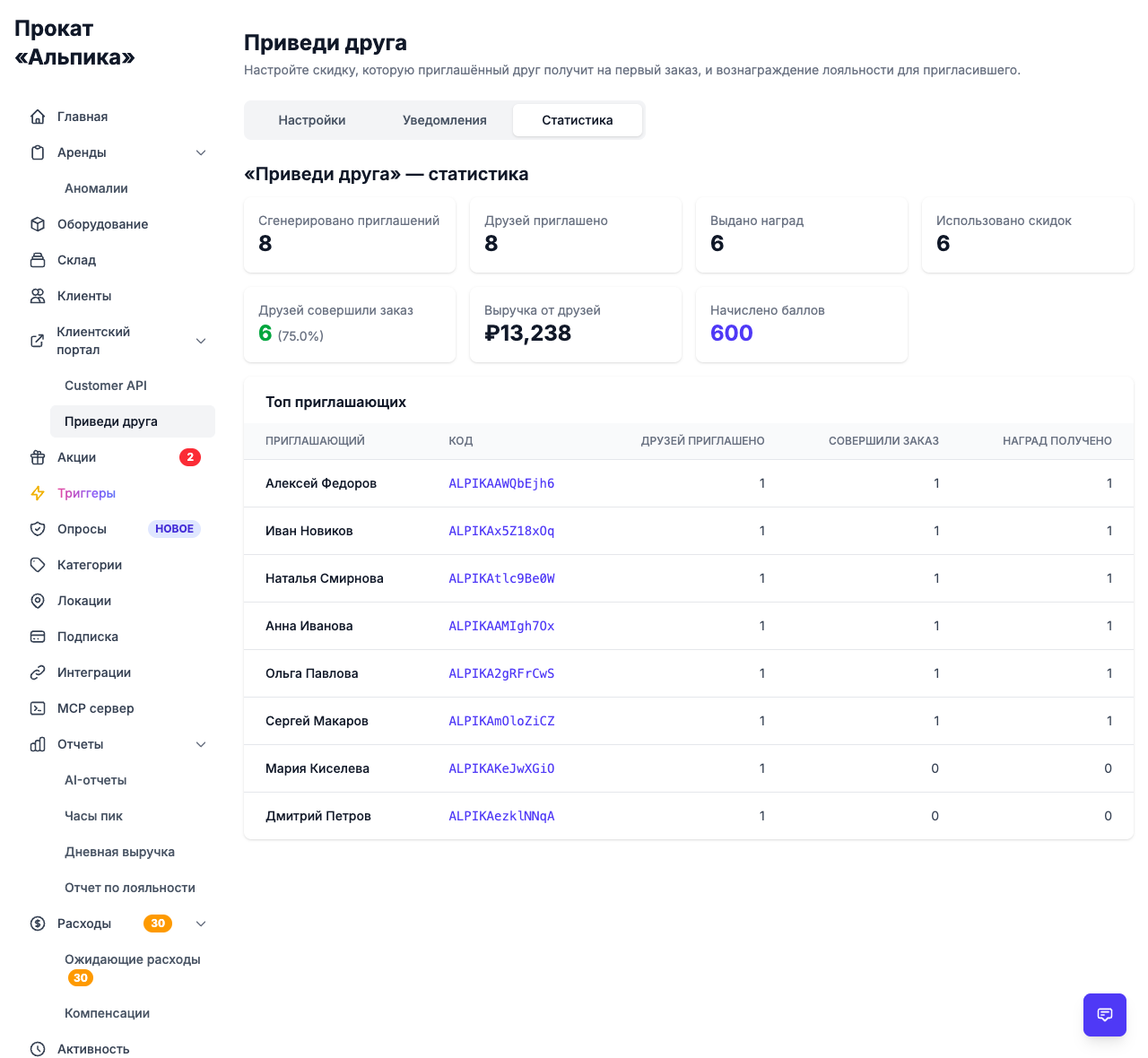
- how many invites were generated;
- how many friends actually linked;
- how many of them placed an order and at what conversion rate;
- revenue from referred friends;
- how many loyalty points were paid out;
- and a leaderboard of your top referrers.
With these numbers you can tell whether a 10% discount or 100 points is too generous or too weak, and which customers bring the most friends.
Tips for a good program
- Keep the reward in proportion. A discount on the first order costs nothing until a new customer actually pays, so starting modest (5–10%) is reasonable and safe.
- Reward the referrer, not just the friend. Loyalty points that the referrer can spend on a future rental keep the loop going.
- Make sharing easy. One link, one code, a QR code at the counter — fewer obstacles means more referrals.
- Use a branded prefix. A recognizable prefix like
ALPIKAmakes codes look native to your brand and immediately identifiable at the front desk. - Launch ahead of the season. People share rentals before their own trip, so start the campaign while demand is building, not at its peak.
- Set clear limits. First-order discount, one friend per invite, no self-referrals — these guardrails are built in to keep the program honest.
The bottom line
A bring-a-friend program is the closest rental business gets to advertising that pays for itself: your best customers do the promotion, the reward is structured and small, and every step is measurable.
With a ready-made page for customers, automatic discount application and a live statistics dashboard, Turborent turns a good idea into a working program in a matter of minutes.